Case Study
Designing a new QuickBooks Payroll onboarding experience from the ground up — a 0 to 1 product built for small business owners running payroll for the first time, with clarity and compliance confidence designed in from day one.
QuickBooks Payroll serves millions of small business owners who need to pay their teams accurately and on time. For many of them, running payroll for the first time is daunting — tax requirements feel foreign, the vocabulary feels legal, and the stakes (paying people correctly, staying compliant) feel high.
I joined the Payroll team as a Product Designer III to design a brand-new onboarding experience from scratch — a 0 to 1 setup flow built specifically for first-time payroll users, with clarity and compliance confidence designed in from day one.
QuickBooks Payroll is one of Intuit’s most critical products. For small business owners — many running payroll for the first time — the onboarding experience is where trust is built or lost. A confusing setup means delayed paychecks, tax filing errors, and potential penalties.
The team committed to designing a dedicated, task-based setup experience from scratch — one that could guide an owner from zero payroll knowledge to their first successful pay run without a tax degree or a CPA on retainer. Nothing off-the-shelf; no legacy flow to inherit; a blank canvas and a high-stakes launch.
“I just want to pay my employees. I shouldn’t need a tax degree to do it.”
— Small Business Owner, User Research Participant
The people we were designing for — small business owners wearing every hat
Because there was no prior flow to analyze, we went straight to the source. I ran moderated interviews and concept-testing sessions with 12 small business owners across different industries — from restaurant owners to freelance agency leads — focused on how they thought about payroll, what they feared most, and what information they actually had on hand when they sat down to set things up.
First-time users couldn’t group the required tasks in their head. Without a clear structure, every field felt equally important and equally intimidating — tax IDs, state registrations, and benefit elections all sitting at the same priority level.
67% of first-time payroll users we interviewed didn’t know what a state tax ID was or where to find one. Most assumed it was something their accountant would handle — until we told them otherwise.
When we concept-tested early flows, the tax section was where users stopped clicking and started second-guessing. If we couldn’t make that moment feel safe, nothing else we designed would matter.
Interviews could only get us so far. Before committing to an information architecture, I wanted to see payroll as it actually happens — not how owners described it, but how they physically did it. I spent time onsite with six small businesses across different industries: a bakery, a coffee shop, a boutique retail store, a graphic design studio, a landscaping company, and a dental practice.
I shadowed owners through parts of their actual workdays, asked them to walk me through how they’d set up payroll for a new hire if they had to do it right now, and paid attention to what happened between clicks — where they looked, what they pulled out of drawers, who they called when they couldn’t remember something.
“Hold on, let me find it — I think the W-4 is in the back office. Or maybe my accountant has it.”
— Bakery Owner, Field Study Participant
What I saw reshaped the entire onboarding architecture. Payroll isn’t a thing that happens inside QuickBooks — QuickBooks is the last stop on a document hunt that starts in filing cabinets, phone notes, email attachments, and shared drives. Any onboarding flow that assumed owners had their info ready at a keyboard was designing for a customer who didn’t exist.
Employee I-9s lived in filing cabinets. Direct deposit forms were screenshots on phones. EINs were on a letter from the IRS taped to a wall. Not a single owner I visited had all their hiring documents in one place — let alone in a format QuickBooks could ingest.
None of the owners I shadowed got more than ten uninterrupted minutes at a time. A phone call, a walk-in customer, a supplier delivery — the setup task always paused. Any flow that required an unbroken session would fail in the real world.
When owners couldn’t find a document, they typed from memory or called their accountant. That meant misspelled names, wrong SSNs, and guessed tax IDs were landing in payroll software every day — and nobody caught the mistakes until a paycheck bounced.
These observations became the non-negotiables for the design: save-and-resume had to be the default (setup would span days, not minutes), every field had to hint at what document to grab (owners needed to know where to look), and optional fields had to stay truly optional (blocking progress on missing info would kill the flow entirely).
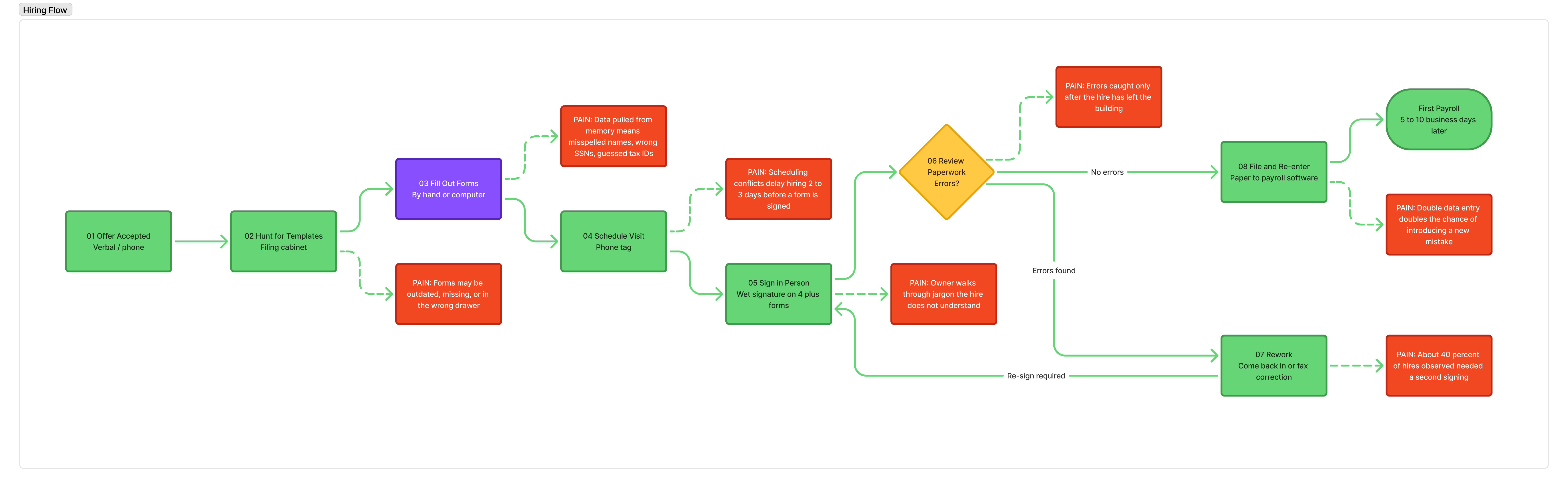
I mapped the current-state hiring journey I observed during field research — the full physical loop a small business owner goes through to hire a single employee. Every green box is a step the owner actually takes. Every red box is a pain point we saw repeat across nearly every business we visited.
The current-state hiring journey — 8 steps, 4+ paper forms per hire, a rework loop from Review back to Sign, and 5 to 10 business days from offer to first payroll. Pain points (red) clustered around the three phases field research flagged as the hardest: template hunting, data entry from memory, and rework when errors were caught after the fact.
The core challenge wasn’t visual — it was an information architecture decision we had to make upfront. The natural engineering instinct was to mirror the backend data model (company info, tax info, employee info), but that’s not how small business owners think about payroll. They think in phases: “get ready,” “add my team,” “run it.” The architecture of the new flow had to honor that from day one, or we’d be patching the foundation for years.
This wasn’t just a usability concern. Every first-time payroll user who couldn’t finish setup was a small business owner who couldn’t pay their team — and a launch customer Intuit risked losing on day one.
We designed the new onboarding experience around three clear phases that matched the user’s mental model: “Get ready to pay your team,” “Add and set up your employees,” and “Review and run your first payroll.”
Each phase used progressive disclosure to reveal complexity only when needed. Tax fields included inline guidance with plain-language explanations. The entire flow was designed to be completable in a single session — but could be paused and resumed without losing progress.
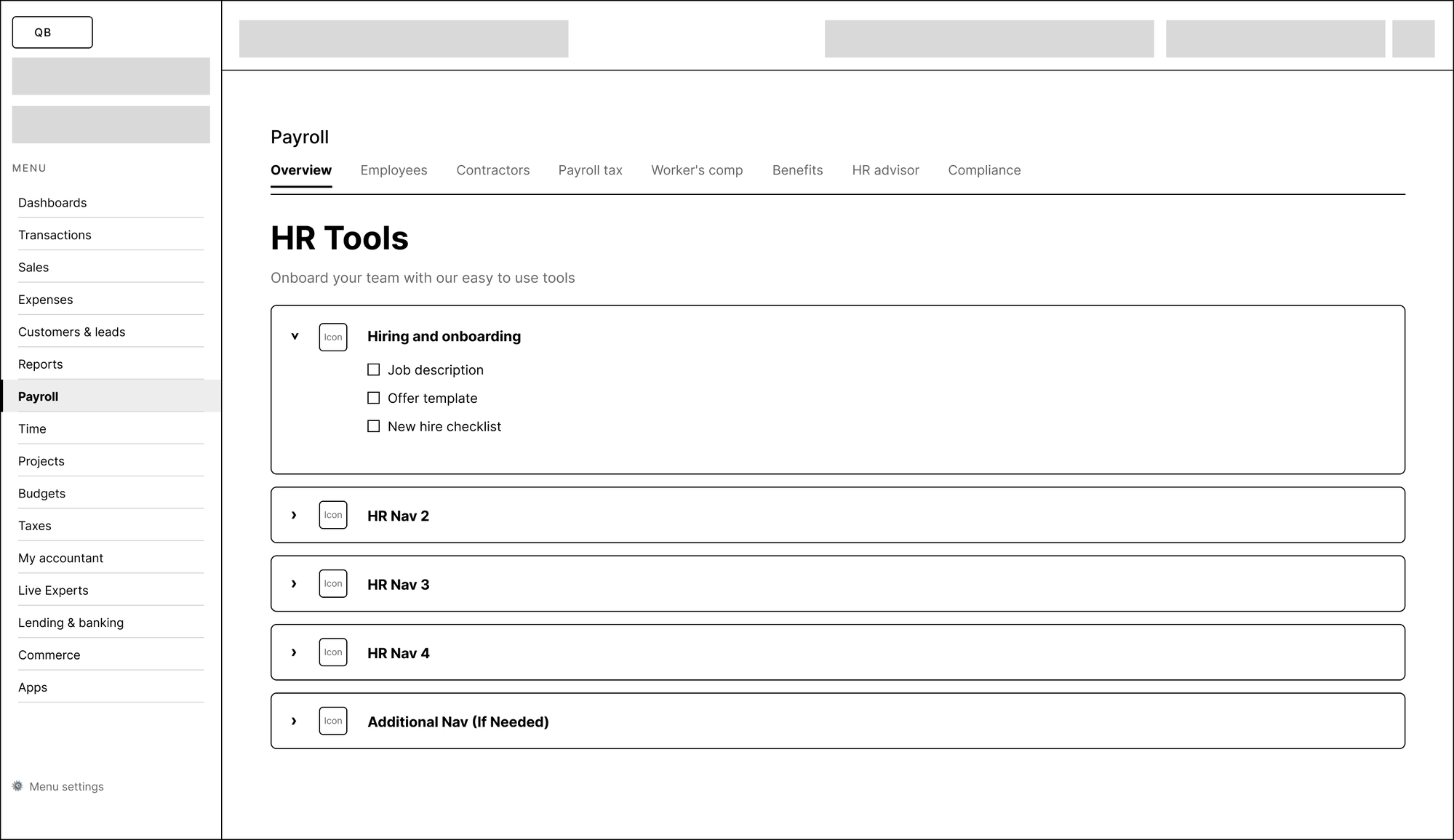
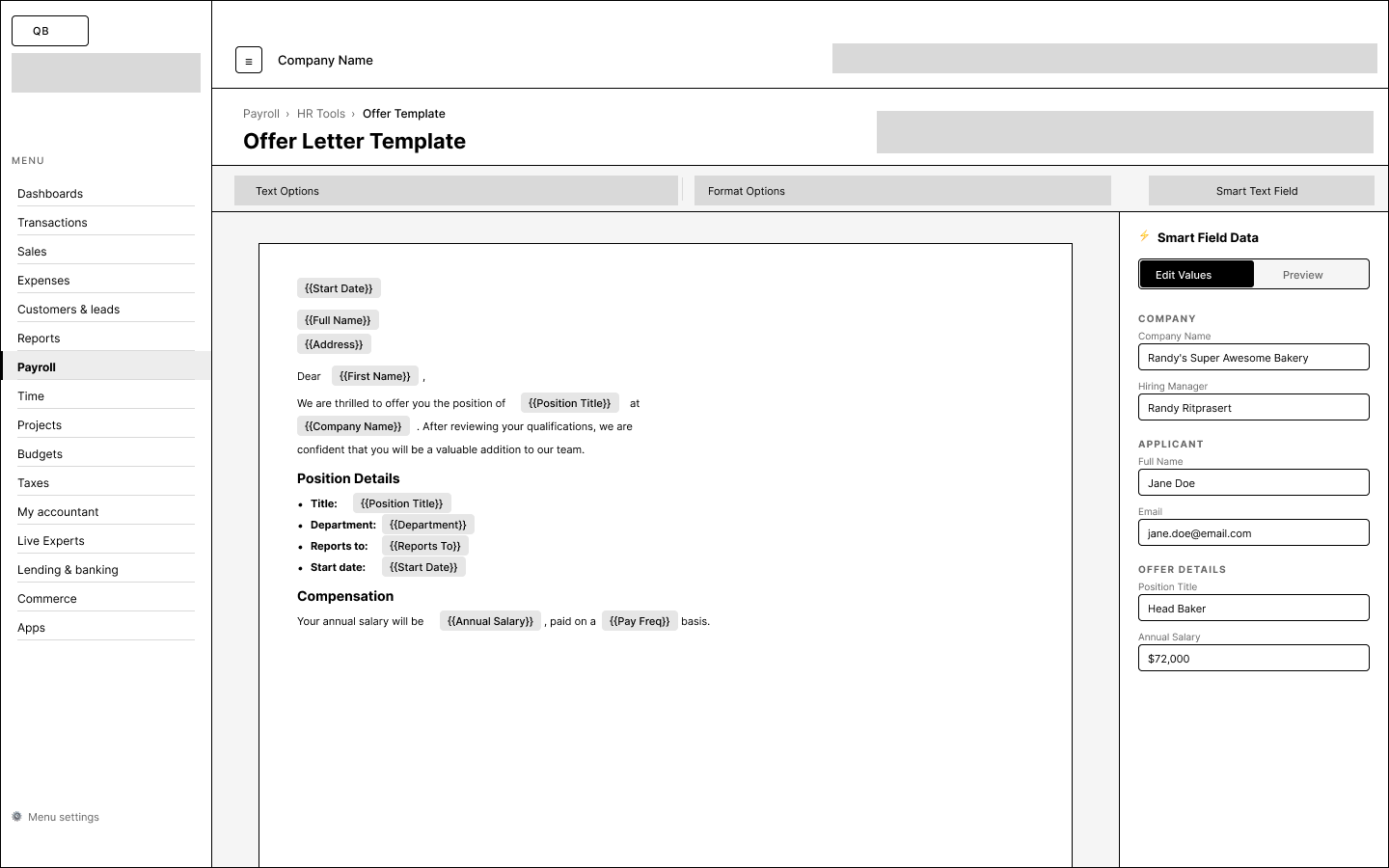
Before any visual design, I sketched the structure in low-fidelity wireframes to validate the task-based architecture — making sure the navigation, hierarchy, and flow felt right before committing to color, type, and components.
Low-fi wireframe of the HR Tools landing page — testing the sidebar/topbar shell, tab navigation, and the accordion pattern with generic placeholder rows before committing to specific category names or icons.
Low-fi wireframe of the Offer Letter Template editor — validating the split between the document canvas (with inline smart-field chips) and the right-side data panel that populates them, before layering on any visual design
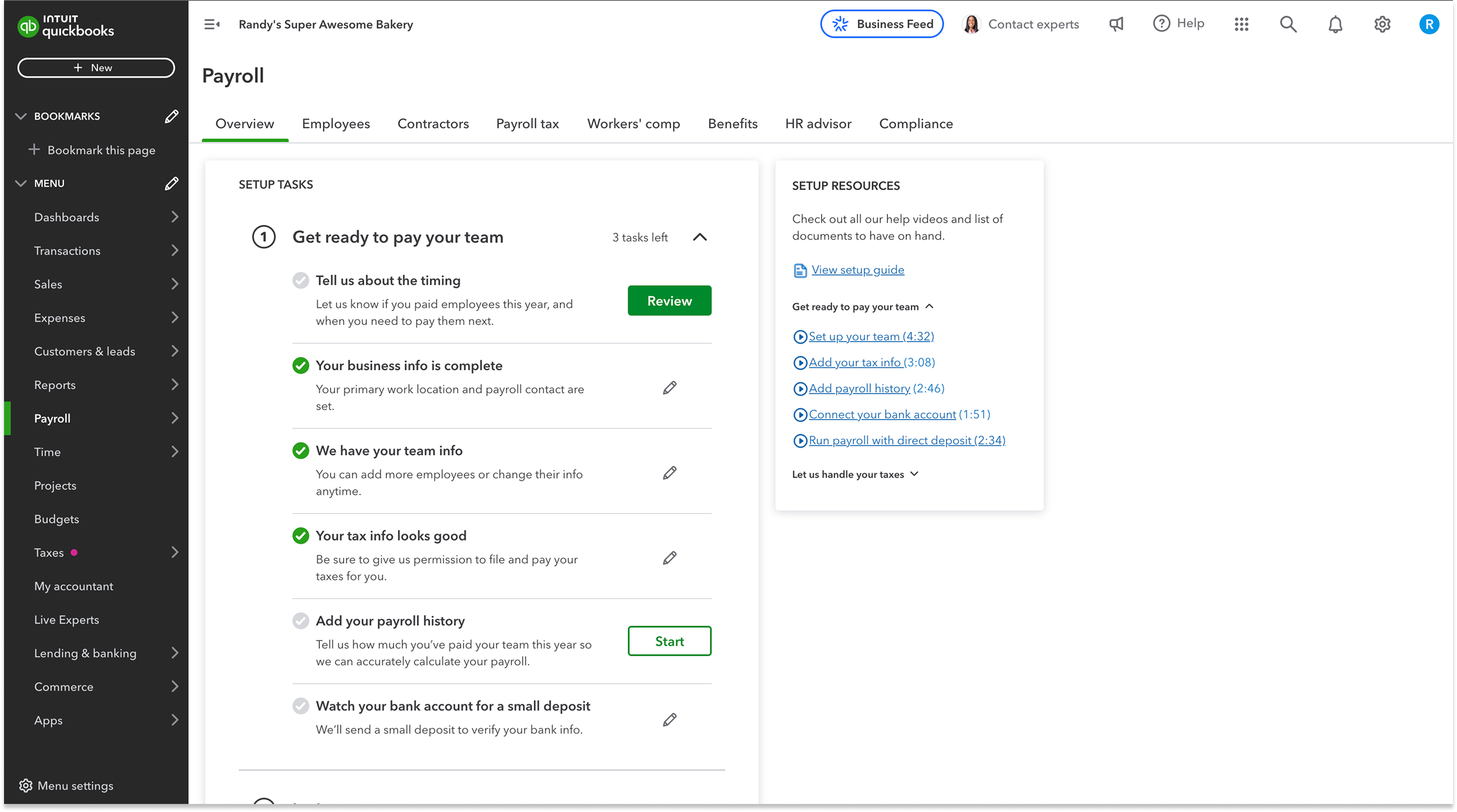
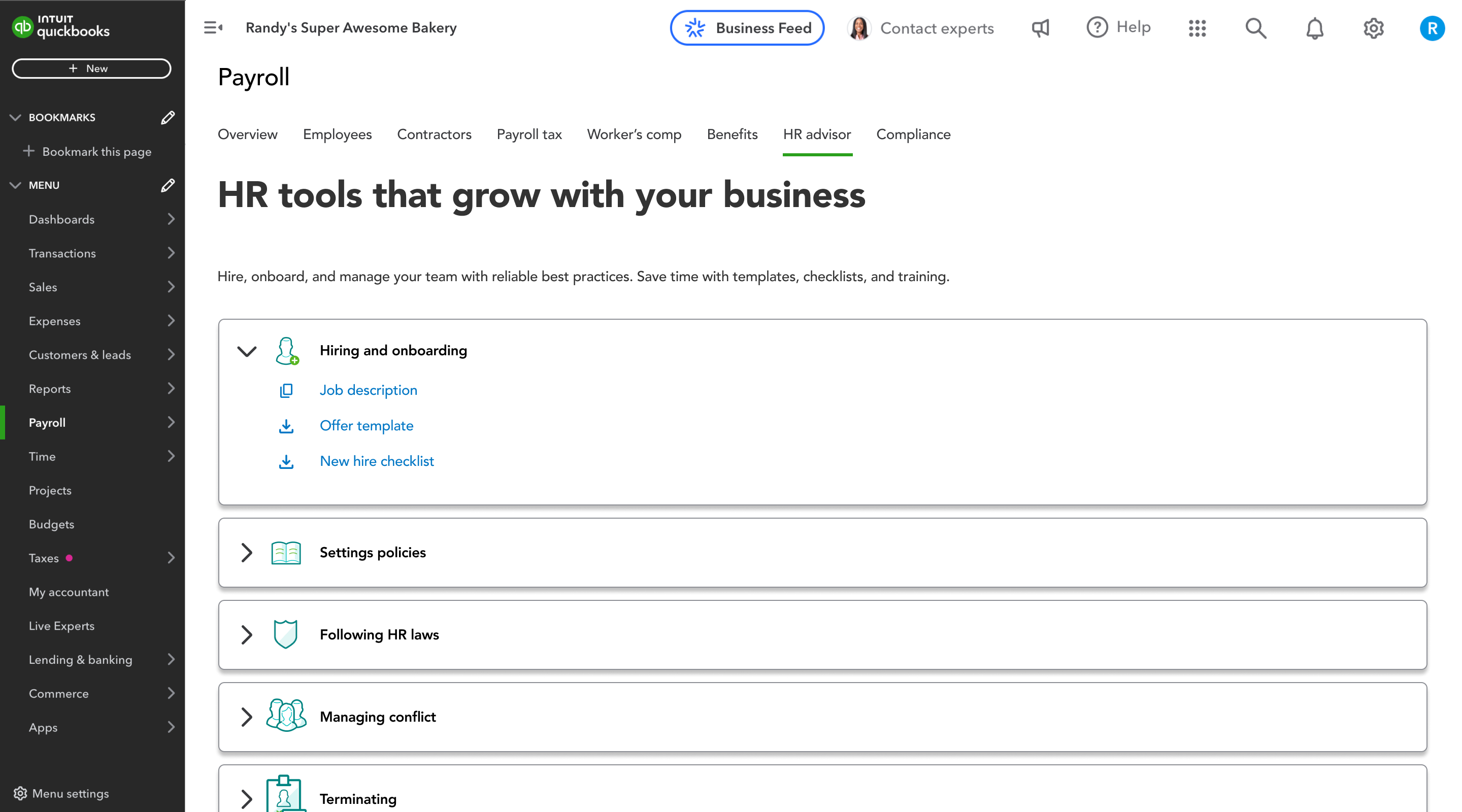
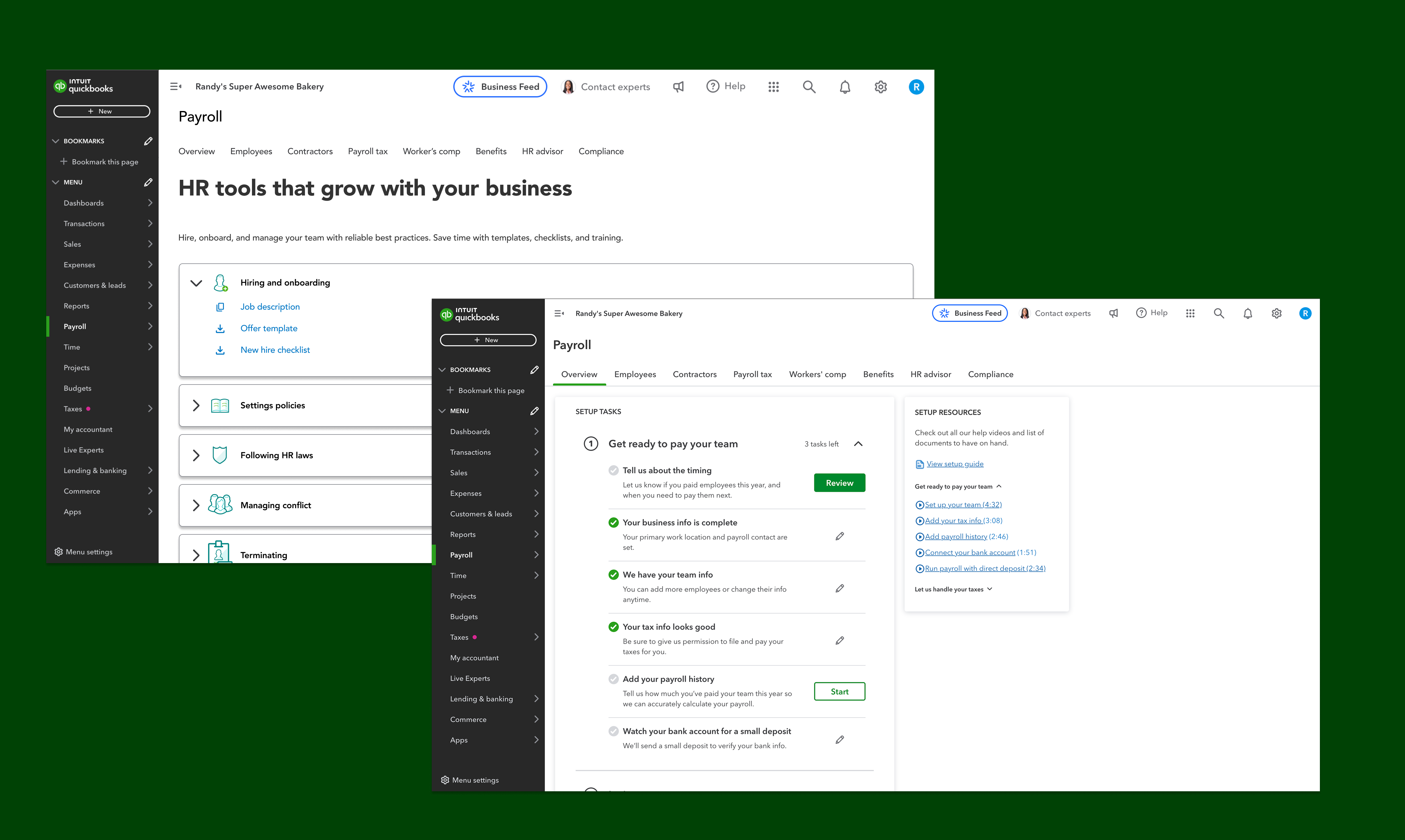
Three key screens from the launch: the task-based Payroll setup Overview, the HR advisor tab that surfaces HR Tools on top of payroll, and the HR management surface that owners land on once onboarding is done.
“Get ready to pay your team” — the task-based Payroll setup Overview that first-time users land on. Each phase groups related steps with a clear state (done, in progress, not started), and inline actions let owners resume from any interruption — the direct design answer to the field-study finding that setup is always interrupted.
HR advisor tab — the HR Tools layer that wraps the payroll setup. The five categories (Hiring and onboarding, Settings policies, Following HR laws, Managing conflict, Terminating) came directly from field research — each is a distinct mental model small business owners already had, so the IA matches the way they think instead of the way the database is organized.
Post-launch metrics from A/B testing the new onboarding against a simpler control variant, plus follow-up user research.
The task-based architecture and progressive disclosure got first-time users to their first successful pay run 30% faster than the A/B control variant — validating the mental-model-first approach at launch.
The tax section had been our biggest risk going into launch. Inline guidance and the “skip and return” pattern got 40% more first-time users through it than the control variant — the single biggest unlock for the new flow.
Post-launch surveys showed users rated their understanding of tax requirements 2x higher than the control variant, reducing downstream support tickets and building trust in a brand-new product on day one.
Key takeaways from designing a new onboarding experience from the ground up for a critical Intuit product.
The biggest unlock was restructuring the flow around how users think about payroll — not how the backend stores data. Task-based framing reduced cognitive load more than any visual polish could.
Tax and compliance sections don’t need to feel like legal documents. Plain-language guidance and contextual help transformed the most dreaded section into one users actually completed with confidence.
Small business owners are constantly interrupted. Designing a “pause and resume” pattern that saved progress and provided clear re-entry points was just as important as simplifying the flow itself.